


In Part 2, we built a working agent harness with three real tools, read_file, write_file, and run_bash. The feedback loop worked. Errors came back as structured signals. The model self-corrected.
But I left something unaddressed on purpose, and it is time to confront it directly.
Our run_bash function was a subprocess.run() call on your local machine. No container. No isolation. No boundary between the model’s generated code and your host filesystem, environment variables, and network. If the agent wrote import os; os.environ into a script and executed it, it would see your API keys. If it ran curl to an attacker-controlled server, nothing would stop it.
This is not a hypothetical. In October 2024, security researcher Johann Rehberger demonstrated what he called the ZombAIs attack against Claude’s Computer Use feature. Using prompt injection embedded in a webpage the agent was browsing, he caused the agent to download and execute the Sliver C2 framework, effectively turning the AI into a remotely controlled zombie on the host machine, with no malicious intent from the user who launched it.
Giving an AI agent a shell is handing it a loaded weapon. Today we are going to look at how a harness builds a secure playground around that weapon.
The Golden Rule: The Harness Belongs Outside the Sandbox
Before containers or virtualization, one architectural principle must be non-negotiable: the agent harness must never run in the same execution context as the agent’s actions.
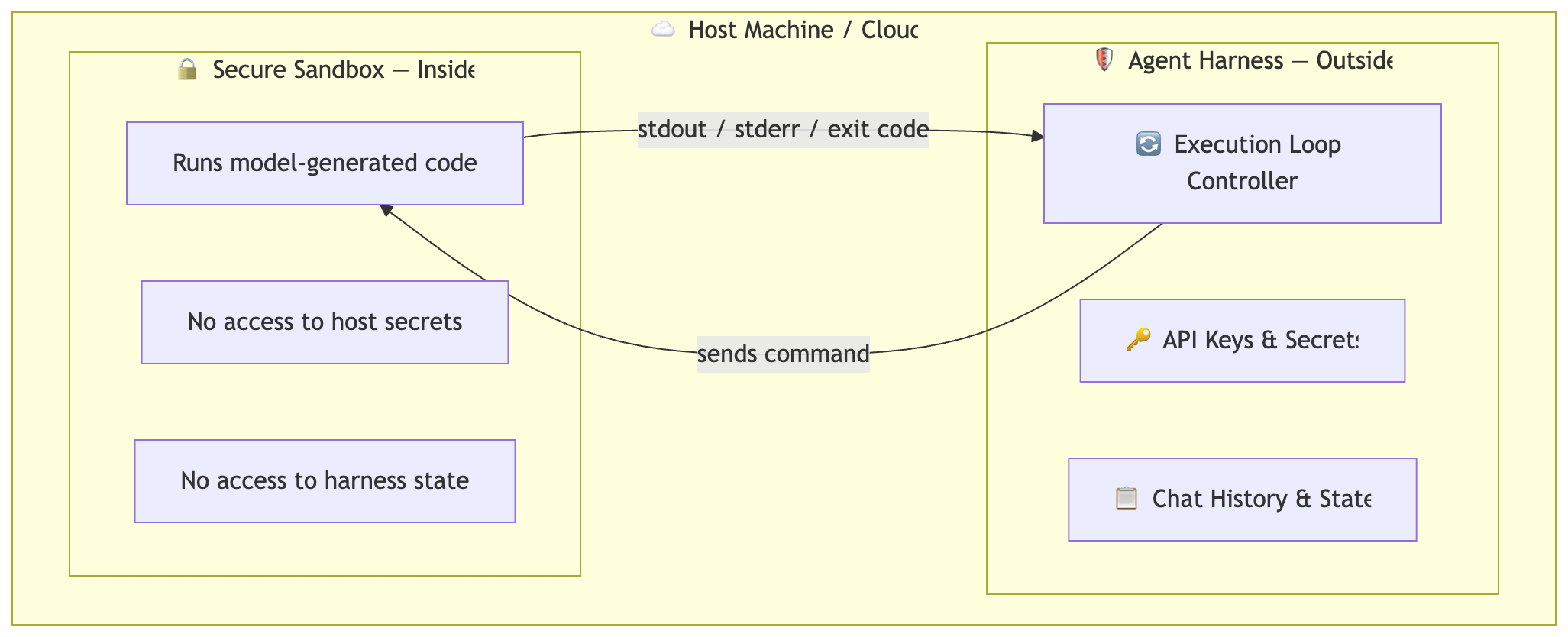
If your harness runs inside the sandbox, a compromised model execution can access your environment variables, modify your history logic, or exfiltrate your API keys. The harness is the warden; the sandbox is the cell. The warden must command from outside — passing instructions in, receiving exit codes and stdout back out.
The Sandboxing Spectrum: Four Isolation Models
Every sandboxing decision involves the same trade-off: isolation security vs. startup latency. Here is where the four primary models land in practice today:
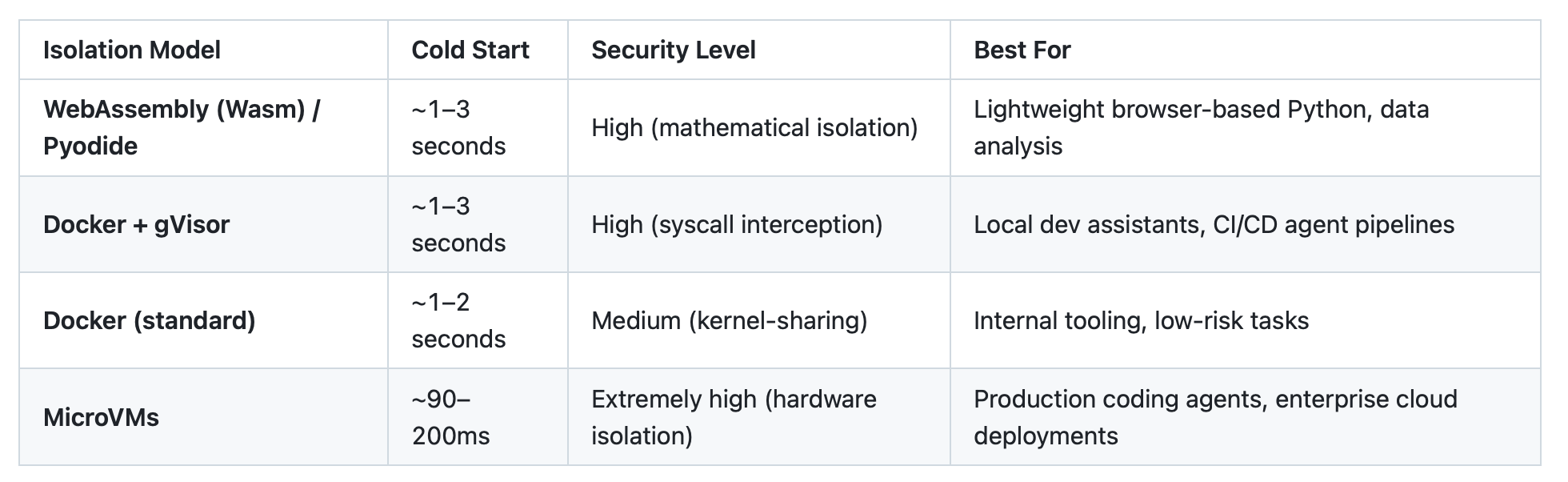
A few clarifications worth calling out explicitly:
WebAssembly & Pyodide: The common claim that Wasm gives you sub-10ms startup is wrong for Python. Pyodide (Python compiled to Wasm) requires downloading ~6 MB of runtime and takes 1–3 seconds to initialize. Once running, it is also 3–5x slower than native CPython. The real advantage is mathematical isolation. Pyodide code cannot escape its Wasm memory boundary by design. It is a good fit for lightweight, browser-based execution but not for general-purpose agent tool calls.
Docker + gVisor: gVisor intercepts system calls in user space rather than passing them to the host kernel directly. This eliminates the biggest Docker security risk (kernel-sharing) while keeping Docker’s ergonomics. Google runs gVisor in production for Cloud Run. The tradeoff is ~10–20% runtime overhead and some syscall compatibility gaps.
Firecracker MicroVMs: Used by AWS Lambda and E2B (a cloud sandbox platform for AI agents processing ~15 million sandboxes/month as of 2025). Each agent gets its own kernel, not just a container namespace. Cold boot is ~90–200ms, and with VM snapshotting it drops to ~150ms for pre-warmed states. This is the production standard for hosted coding agents.
Filesystem Isolation: Setting Clear Boundaries
An agent refactoring a codebase needs file access. The question is which files.
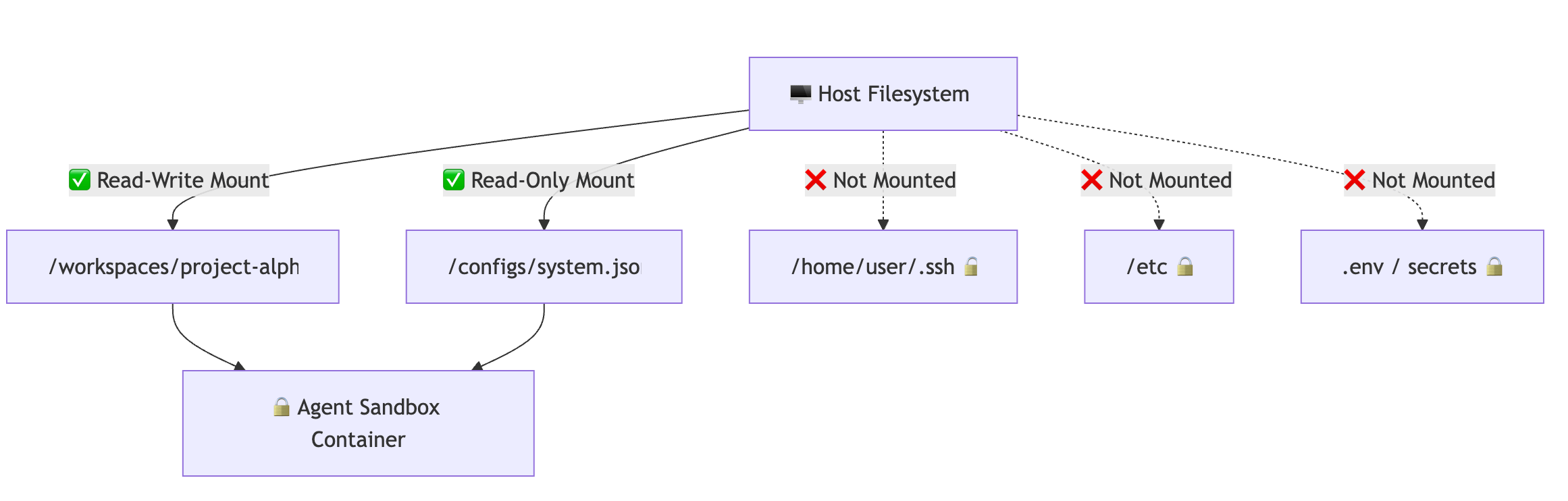
Three rules make this work in practice:
1. Mount explicitly, never from root. Never bind-mount / or ~. Only mount the specific directory the agent is assigned to work in.
2. Use ephemeral copies for high-risk tasks. Copy the target repository into a temporary path (/tmp/agent-run-xyz) and mount that instead. When the agent finishes, diff the changes, present them to the user, then destroy the container. The original is never touched directly.
3. Run as a non-root user. Always run the container with a non-privileged user (--user 1000:1000). This prevents model-generated code from installing kernel modules, modifying network routes, or writing to system directories even if a container escape is attempted.
From Subprocess to Docker: Upgrading Your Part 2 Harness
In Part 2, the run_bash function was a bare subprocess.run(). Here is what the upgrade looks like — a drop-in Docker replacement that applies all the isolation rules above:
import subprocess

def run_in_docker_sandbox(command: str, workspace_path: str) -> tuple[str, bool]:
    """
    Execute a command inside an ephemeral Docker container.
    Drop-in replacement for the bare subprocess run_bash from Part 2.
    """
    docker_cmd = [
        "docker", "run",
        "--rm",                                      # destroy container on exit
        "--network", "none",                         # no network access by default
        "--memory", "512m",                          # hard memory cap
        "--cpus", "1.0",                             # hard CPU cap
        "--read-only",                               # root filesystem is read-only
        "--tmpfs", "/tmp:size=100m",                 # writable scratch space only
        "-v", f"{workspace_path}:/workspace:rw",    # mount only the workspace
        "-w", "/workspace",                          # set working directory
        "--user", "1000:1000",                       # non-root user
        "python:3.11-slim",
        "bash", "-c", f"timeout 30 {command}",      # inner timeout
    ]

    try:
        result = subprocess.run(
            docker_cmd,
            capture_output=True,
            text=True,
            timeout=35,    # outer timeout slightly longer than inner
        )
        output = (result.stdout + result.stderr).strip()
        return output or "(no output)", result.returncode != 0
    except subprocess.TimeoutExpired:
        return "Error: sandbox timed out", True
    except Exception as e:
        return f"Error: {e}", True
Notice what each flag does:
--rmensures the container is destroyed after each tool call, no state leaks between runs--network nonecuts off all external network access entirely--read-only+--tmpfsmeans the agent can only write to/tmpand the mounted workspace, nothing else on the filesystem--user 1000:1000ensures model-generated code runs without root privilegesThe double timeout (inner
timeout 30+ outertimeout=35) guarantees the harness is never blocked by a runaway process
To plug this into the AgentHarness from Part 2, replace the run_bash function in TOOL_REGISTRY with a lambda that calls run_in_docker_sandbox with your workspace path.
Ready-Made Sandboxing Libraries
If you do not want to manage Docker configuration yourself, several open-source libraries handle the heavy lifting. Here are three worth knowing, each covering a different point on the isolation spectrum:
E2B (e2b-code-interpreter)
E2B is the most production-ready option for AI agent sandboxing. Under the hood it uses Firecracker microVMs — each sandbox gets its own kernel. The Python SDK makes it a near drop-in replacement for the Docker function above:
from e2b_code_interpreter import Sandbox

def run_in_e2b_sandbox(command: str) -> tuple[str, bool]:
    with Sandbox() as sandbox:
        result = sandbox.run_code(command)
        output = "\n".join(str(o) for o in result.logs.stdout)
        error  = "\n".join(str(e) for e in result.logs.stderr)
        is_error = bool(result.error)
        return (error if is_error else output) or "(no output)", is_error
Install with pip install e2b-code-interpreter. Requires an E2B API key. Best choice if you are building a cloud-hosted agent and want hardware-level isolation without managing infrastructure.
RestrictedPython
RestrictedPython takes a different approach — rather than isolating at the OS level, it restricts what Python code is allowed to do at parse time. You define exactly which builtins, imports, and operations are permitted before the code ever runs.
from RestrictedPython import compile_restricted, safe_globals

def run_restricted_python(code: str) -> tuple[str, bool]:
    try:
        byte_code = compile_restricted(code, "<string>", "exec")
        local_vars = {}
        exec(byte_code, safe_globals, local_vars)
        return str(local_vars.get("result", "(no result)")), False
    except Exception as e:
        return f"{type(e).__name__}: {e}", True
Install with pip install RestrictedPython. No containers needed — useful when Docker is overkill and you only need to prevent agents from importing os, subprocess, or sys. Not a replacement for OS-level isolation for untrusted code, but a solid lightweight layer for constrained use cases.
Monty (pydantic-monty)
Monty is the most interesting new entrant in this space — a minimal, secure Python interpreter written in Rust by the Pydantic team, designed specifically for running LLM-generated code. It starts in under a microsecond, requires no containers, and completely blocks access to the host filesystem, environment variables, and network by default. You control exactly which host functions the agent can call.
import pydantic_monty

def run_in_monty(code: str) -> tuple[str, bool]:
    try:
        result = pydantic_monty.run(code)
        return result.stdout or "(no output)", False
    except pydantic_monty.ExecutionError as e:
        return str(e), True
Install with pip install pydantic-monty. The tradeoff is intentional scope — Monty runs a subset of Python and does not support third-party libraries like NumPy or Pydantic itself. It is designed for agents that express logic in pure Python rather than calling into ecosystem packages. Worth watching closely: Pydantic plans to use it as the foundation for code execution in PydanticAI, and it is still marked experimental at the time of writing.
Deno (for JavaScript/TypeScript agents)
If your agent executes JavaScript or TypeScript, Deno has a built-in permission model that makes sandboxing a flag, not an architecture decision:
# Agent-generated script runs with explicit, minimal permissions only
deno run --allow-read=/workspace --allow-write=/workspace/output --no-prompt agent_script.ts
Deno denies all filesystem, network, and environment access by default. You opt-in to exactly what the agent needs. Install with curl -fsSL https://deno.land/install.sh | sh. Best fit for TypeScript-first agent stacks.
Network Egress: The Most Overlooked Attack Surface
Even with a containerized sandbox, unlimited internet access is a liability. A prompt-injected agent can participate in DDoS attacks, exfiltrate data, or, as ZombAIs demonstrated, phone home to a C2 server.
Two practical controls:
Allowlist over blocklist. Rather than trying to block malicious domains, restrict outbound traffic to a known-good set: pypi.org, npmjs.com, github.com, your internal registry. Everything else is denied by default. This is far more defensible than maintaining a blocklist.
Block cloud metadata endpoints. If your sandbox runs in a cloud environment (AWS, GCP, Azure), the instance metadata service at 169.254.169.254 is a prime target for SSRF attacks — a compromised agent can use it to steal IAM credentials. Block this at the network level and enforce IMDSv2 (require token-authenticated requests) at the cloud provider level. This was an active exploitation target as recently as early 2025.
Process Guardrails: Bounding Cost and Blast Radius
Even inside an isolated container, an agent can write an infinite loop or spawn thousands of subprocesses:
CPU and memory caps: The
--memoryand--cpusDocker flags are your first line. Set them conservatively for agent tasks — 512 MB RAM and 1 CPU is sufficient for most code execution workloads.Process limit: Add
--pids-limit 100to cap the number of processes the container can spawn. This stops fork bombs and runaway test runners.Disk quota: Use Docker’s
--storage-opt size=1G(with a supported storage driver) to cap how much the agent can write to the mounted workspace.
Human-in-the-Loop as a Security Gate
Some commands should never run without explicit approval, regardless of sandbox isolation. The harness is the right place to intercept them:
REQUIRES_APPROVAL = [
    r"curl\s+.*\|\s*(bash|sh)",   # curl pipe to shell
    r"wget\s+.*\|\s*(bash|sh)",   # wget pipe to shell
    r"git\s+push",                # pushing code
    r"pip\s+install\s+--index",   # installing from non-standard index
]

def requires_human_approval(command: str) -> bool:
    import re
    return any(re.search(pattern, command) for pattern in REQUIRES_APPROVAL)
Wire this into the pre-execution hook from Part 2. If requires_human_approval() returns True, the harness pauses and prints the command for the user to approve or deny before the sandbox sees it. The agent never knows the gate exists — it just receives a response or a timeout.
What’s Next?
A secure, sandboxed harness is now capable of running code safely over many iterations. But as tasks grow in complexity — refactoring a large codebase, researching a topic across dozens of sources, debugging a multi-file system — the agent will start to hit a different wall: context window bloat.
After 50 tool calls and thousands of lines of output, the conversation history becomes unwieldy, expensive, and eventually truncated. The agent starts to “forget” earlier decisions.
In Part 4 of this series, we will tackle Managing the Long-Running Agent: context compaction, dynamic history compression, and strategies for keeping an agent coherent across hours of execution without burning through your entire token budget in the first 20 minutes.