
Inside the Machine: The Anatomy of an Agent Harness

In Part 1, I argued that the harness is more important than the model, that the teams shipping reliable autonomous agents win by obsessing over the infrastructure around the LLM, not just the weights inside it.
That was the “why.” This post is the “what” and “how.”
We will deconstruct the anatomy of a production-grade agent harness, map out its execution lifecycle, and walk through a complete, working Python implementation you can run today. By the end, you will have a blueprint you can extend into your own projects.
The 5 Architectural Pillars of a Harness
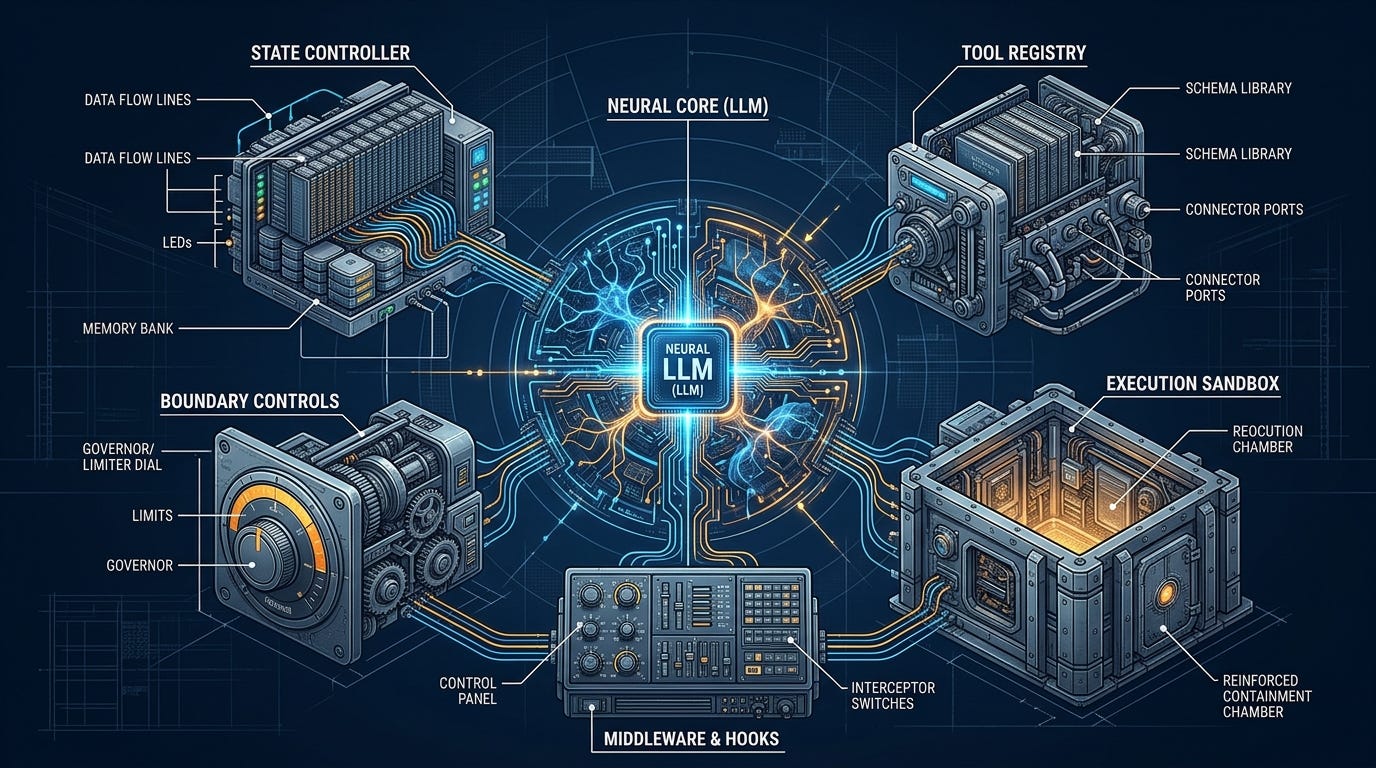
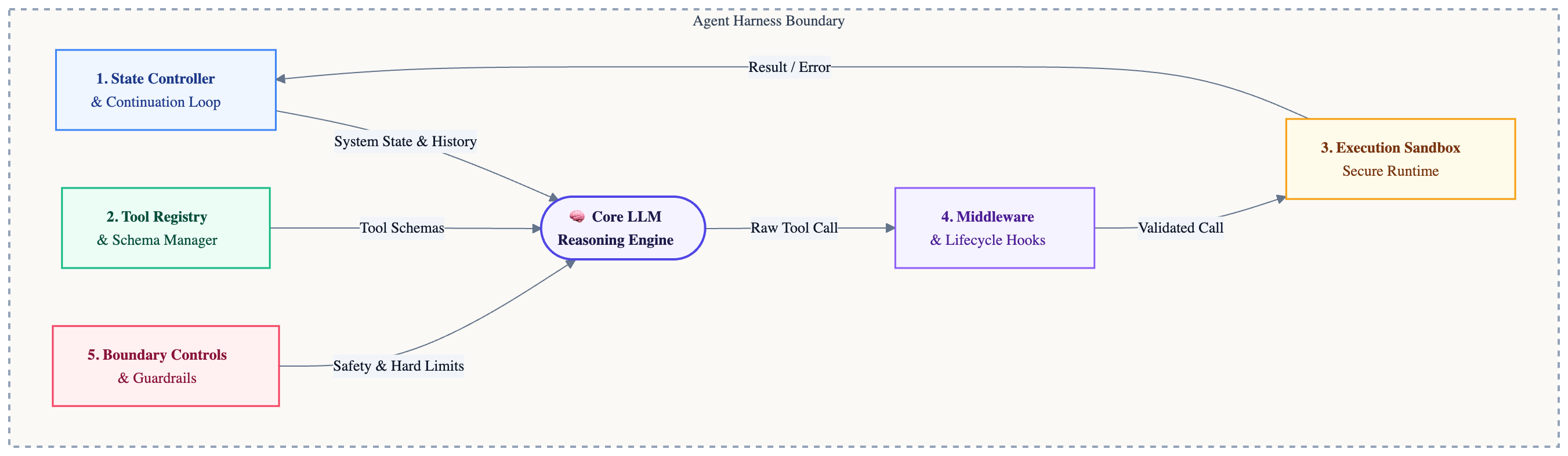
An agent harness is more than an infinite while loop calling an API. In a production environment, a resilient harness consists of five distinct components working in unison:
1. The State Controller & Continuation Loop
An agent operating in the wild cannot be ephemeral. If a network request drops or a rate limit is hit, the agent must resume exactly where it left off. The State Controller maintains a durable, append-only conversation history, every prompt sent, every tool result received, so that each new step picks up with full context intact.
2. The Tool Registry and Schema Manager
Models do not natively understand APIs, file systems, or shells. The Tool Registry translates between model intent and real-world system interfaces by maintaining a catalogue of declarative tool schemas, structured definitions the model reads to understand what a tool does and what parameters it expects. The registry also validates inputs before execution, rejecting malformed calls at the harness level and saving expensive API roundtrips.
3. The Execution Sandbox
A raw terminal is a liability. A robust harness isolates every tool call: commands run inside constrained environments (Docker containers, microVMs, or at minimum a subprocess with strict timeouts and blocked patterns) rather than directly on your host. In our implementation we use a subprocess with a blocklist and timeout, and we are honest about what a production sandbox looks like in Part 3.
4. Deterministic Middleware & Lifecycle Hooks
Hooks intercept every tool call before and after execution, the same pattern HTTP frameworks use for authentication and logging middleware. Pre-execution hooks can block or rewrite a call (a linter catching bad syntax before wasting a compile cycle). Post-execution hooks can run tests and return pass/fail as feedback.
5. Boundary Controls & Guardrails
The harness is the last line of defense against runaway costs and infinite loops. Hard iteration caps guarantee a termination point regardless of what the model decides internally. Token budgets and timeout limits enforce financial boundaries.
The Lifecycle of a Single Step
Before reading the code, it helps to see how these five pillars interact during a single execution step:
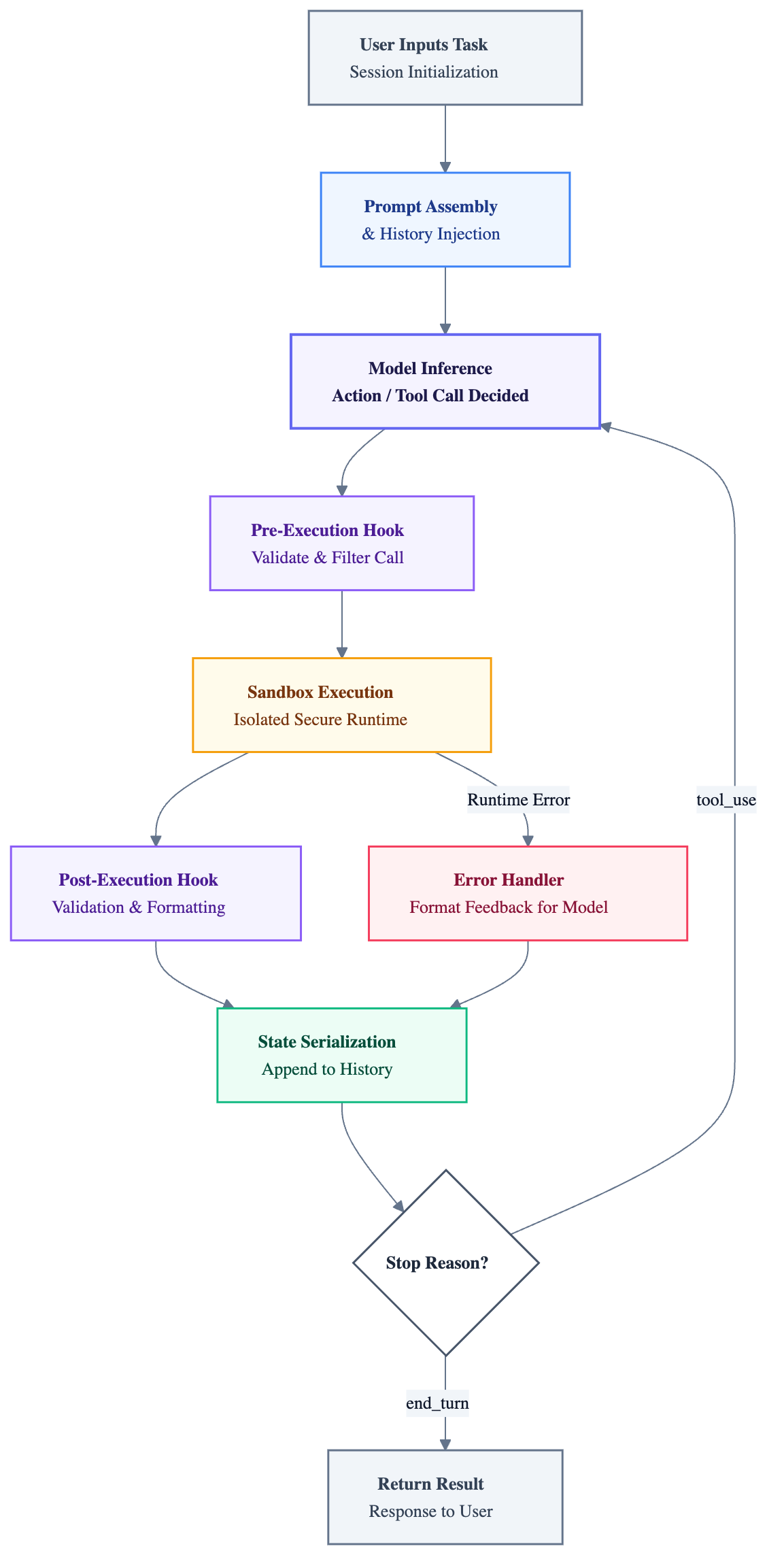
The critical insight is in the bottom path: errors are not crashes. The harness intercepts them, formats them as structured feedback, appends them to the conversation history, and loops, giving the model the information it needs to self-correct on the next step.
The Complete Implementation
Here is a fully working, minimal agent harness in Python. It uses the Anthropic API with real tool execution, a proper tool registry, lifecycle hooks, and boundary controls, but you can replace it with any other LLM provider or even your own local model. You can run this with pip install anthropic.
Before running, set your API key:
export ANTHROPIC_API_KEY=your-key-here#!/usr/bin/env python3
"""
Minimal Agent Harness — Educational Implementation
Demonstrates the 5 architectural pillars of a production harness:
1. State Controller & Continuation Loop
2. Tool Registry & Schema Manager
3. Execution Sandbox (subprocess with blocklist + timeout)
4. Middleware & Lifecycle Hooks (pre/post interceptors)
5. Boundary Controls & Guardrails (iteration cap, timeout)
"""
import json
import subprocess
from pathlib import Path
import anthropic
# ─── PILLAR 3: EXECUTION SANDBOX ────────────────────────────────────────────
# These are the actual tool implementations. In a production harness these
# would run inside Docker or a microVM. Here we use subprocess with a blocklist
# and a hard timeout as a minimal safety layer.
BLOCKED_PATTERNS = ["rm -rf", "sudo", ":(){:|:&};:", "> /dev/", "mkfs", "dd if="]
def read_file(path: str) -> str:
try:
return Path(path).read_text()
except FileNotFoundError:
return f"Error: file not found: {path}"
except Exception as e:
return f"Error: {e}"
def write_file(path: str, content: str) -> str:
try:
Path(path).parent.mkdir(parents=True, exist_ok=True)
Path(path).write_text(content)
return f"Wrote {len(content)} characters to {path}"
except Exception as e:
return f"Error: {e}"
def run_bash(command: str) -> str:
for pattern in BLOCKED_PATTERNS:
if pattern in command:
return f"Blocked: command contains disallowed pattern '{pattern}'"
try:
result = subprocess.run(
command,
shell=True,
capture_output=True,
text=True,
timeout=30, # Hard cap: no command runs forever
)
return (result.stdout + result.stderr).strip() or "(no output)"
except subprocess.TimeoutExpired:
return "Error: command timed out after 30 seconds"
except Exception as e:
return f"Error: {e}"
# ─── PILLAR 2: TOOL REGISTRY & SCHEMA MANAGER ───────────────────────────────
# Maps tool names to implementations and exposes Anthropic-compatible schemas.
# The model reads these schemas to understand what tools exist and how to call them.
TOOL_REGISTRY = {
"read_file": read_file,
"write_file": write_file,
"run_bash": run_bash,
}
TOOL_SCHEMAS = [
{
"name": "read_file",
"description": "Read the full contents of a file at the given path.",
"input_schema": {
"type": "object",
"properties": {
"path": {"type": "string", "description": "Relative or absolute file path"}
},
"required": ["path"],
},
},
{
"name": "write_file",
"description": "Write text content to a file, creating it if it does not exist.",
"input_schema": {
"type": "object",
"properties": {
"path": {"type": "string", "description": "File path to write to"},
"content": {"type": "string", "description": "Text content to write"},
},
"required": ["path", "content"],
},
},
{
"name": "run_bash",
"description": (
"Execute a shell command and return its output. "
"Use for running scripts, installing packages, or checking system state. "
"Destructive commands are blocked."
),
"input_schema": {
"type": "object",
"properties": {
"command": {"type": "string", "description": "The bash command to run"}
},
"required": ["command"],
},
},
]
# ─── THE AGENT HARNESS ───────────────────────────────────────────────────────
class AgentHarness:
"""
A minimal, self-correcting agent harness.
All five pillars are implemented:
1. history[] maintains durable state across iterations
2. TOOL_SCHEMAS + TOOL_REGISTRY handle registration and dispatch
3. _dispatch_tool() runs tools in the sandbox
4. _handle_tool_calls() wraps each call with pre/post hooks
5. max_iterations enforces a hard termination boundary
"""
def __init__(self, system_prompt: str, max_iterations: int = 10):
self.client = anthropic.Anthropic()
self.system_prompt = system_prompt
self.max_iterations = max_iterations
# PILLAR 1: durable state — the full conversation lives here
self.history: list[dict] = []
self.iteration = 0
# ── PUBLIC INTERFACE ─────────────────────────────────────────────────────
def run(self, task: str) -> str:
"""Run the agent on a task and return its final text response."""
print(f"\n[Harness] Task: {task[:80]}...")
self.history.append({"role": "user", "content": task})
while self.iteration < self.max_iterations:
self.iteration += 1
print(f"\n[Harness] ── Step {self.iteration}/{self.max_iterations} ──")
response = self.client.messages.create(
model="claude-opus-4-7",
max_tokens=4096,
system=self.system_prompt,
tools=TOOL_SCHEMAS,
messages=self.history,
)
if response.stop_reason == "end_turn":
print("[Harness] Goal reached.")
return self._extract_text(response)
if response.stop_reason == "tool_use":
# PILLAR 4: middleware intercepts every tool call
self._handle_tool_calls(response)
# PILLAR 5: hard boundary — guaranteed termination
print("[Harness] Iteration limit reached. Halting.")
return "Stopped: maximum iteration limit reached."
# ── PRIVATE METHODS ──────────────────────────────────────────────────────
def _handle_tool_calls(self, response) -> None:
"""Execute all tool calls in a response and feed results back into history."""
# Save the full assistant message (including tool_use blocks) to history
self.history.append({"role": "assistant", "content": response.content})
tool_results = []
for block in response.content:
if block.type != "tool_use":
continue
# PRE-EXECUTION HOOK: log, validate, or block before anything runs
print(f"[Hook:pre] → {block.name}({json.dumps(block.input)[:100]})")
result, is_error = self._dispatch_tool(block.name, block.input)
# POST-EXECUTION HOOK: log outcome; extend here for test runners, linters, etc.
status = "error" if is_error else "ok"
print(f"[Hook:post] ← [{status}] {result[:100]}")
tool_results.append({
"type": "tool_result",
"tool_use_id": block.id,
"content": result,
"is_error": is_error, # tells the model this is an error to recover from
})
# Append results as a user message — this closes the feedback loop.
# The model sees tool outputs (or errors) on the next iteration and
# decides whether to retry, adjust, or proceed.
self.history.append({"role": "user", "content": tool_results})
def _dispatch_tool(self, name: str, args: dict) -> tuple[str, bool]:
"""Look up a tool from the registry and call it. Returns (output, is_error)."""
tool_fn = TOOL_REGISTRY.get(name)
if tool_fn is None:
return f"Unknown tool: '{name}'", True
try:
return str(tool_fn(**args)), False
except Exception as e:
# Exceptions become structured feedback — not application crashes
return f"{type(e).__name__}: {e}", True
@staticmethod
def _extract_text(response) -> str:
for block in response.content:
if hasattr(block, "text"):
return block.text
return ""
# ─── ENTRYPOINT ──────────────────────────────────────────────────────────────
SYSTEM_PROMPT = """\
You are a coding assistant with access to a filesystem and a bash shell.
Complete tasks step by step. Always verify your work by running it.
If something fails, read the error carefully and fix it before moving on.\
"""
if __name__ == "__main__":
harness = AgentHarness(system_prompt=SYSTEM_PROMPT, max_iterations=10)
result = harness.run(
"Write a Python function that returns the nth Fibonacci number, "
"save it to fibonacci.py, then run it with n=10 to verify it works."
)
print(f"\n[Final Answer]\n{result}")What Makes This a Harness, and Not Just a Wrapper?
Looking at the code above, three behaviors stand out that elevate it beyond a simple API call:
1. The application never crashes on tool failure.
Any exception from read_file, write_file, or run_bash is caught inside _dispatch_tool and returned as a structured string with is_error=True. The model receives it as feedback, not as a Python traceback that kills the process. If the agent writes broken code and run_bash returns a SyntaxError, the harness feeds that error back and the model fixes it on the next step, without any human intervention.
2. Errors are formatted as instructions.
Setting is_error=True in the tool result is not cosmetic. The Anthropic API treats it as a signal that the model should analyze what went wrong and decide how to recover. This is the self-correction loop made concrete: the model is not told how to fix the error, but it is given the error precisely, and its next action should be a correction.
3. Termination is structurally guaranteed.
The while loop has a hard ceiling at max_iterations. No matter what logic the model follows internally, retrying the same broken approach five times, generating new subtasks, calling tools in unexpected orders, the harness guarantees a termination point. This is what makes agent systems safe to run unsupervised.
Extending the Blueprint
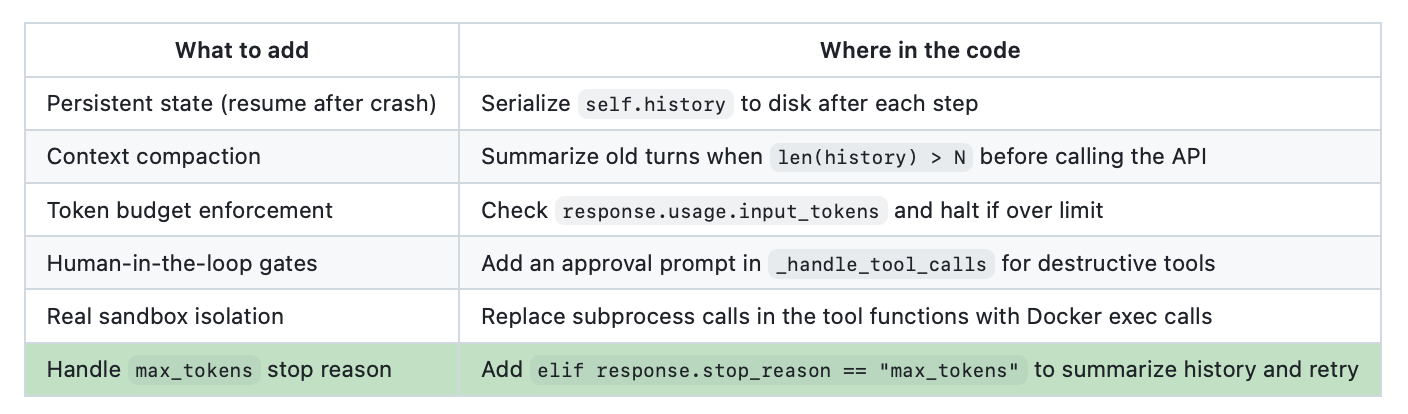
The implementation above is intentionally minimal. Here is where you would add more production pillars:
What’s Next?
The sandbox in our implementation, subprocess calls with a blocklist and a timeout, is a good starting point for learning, but it is not what you would ship. A production harness needs genuine isolation: the agent’s code must not be able to read your SSH keys, saturate your CPU, or exfiltrate environment variables.
In Part 3 of this series, we will tackle Sandboxing & Execution Security in Harness Engineering. We will look at how to wrap agent tool calls in Docker containers, handle filesystem mounts safely, and build a security layer that lets your agent run with real permissions without putting your host at risk.