
Building a Production-Ready SQL Agent with LangGraph
How to turn natural language into safe, accurate SQL queries using a multi-node agentic workflow

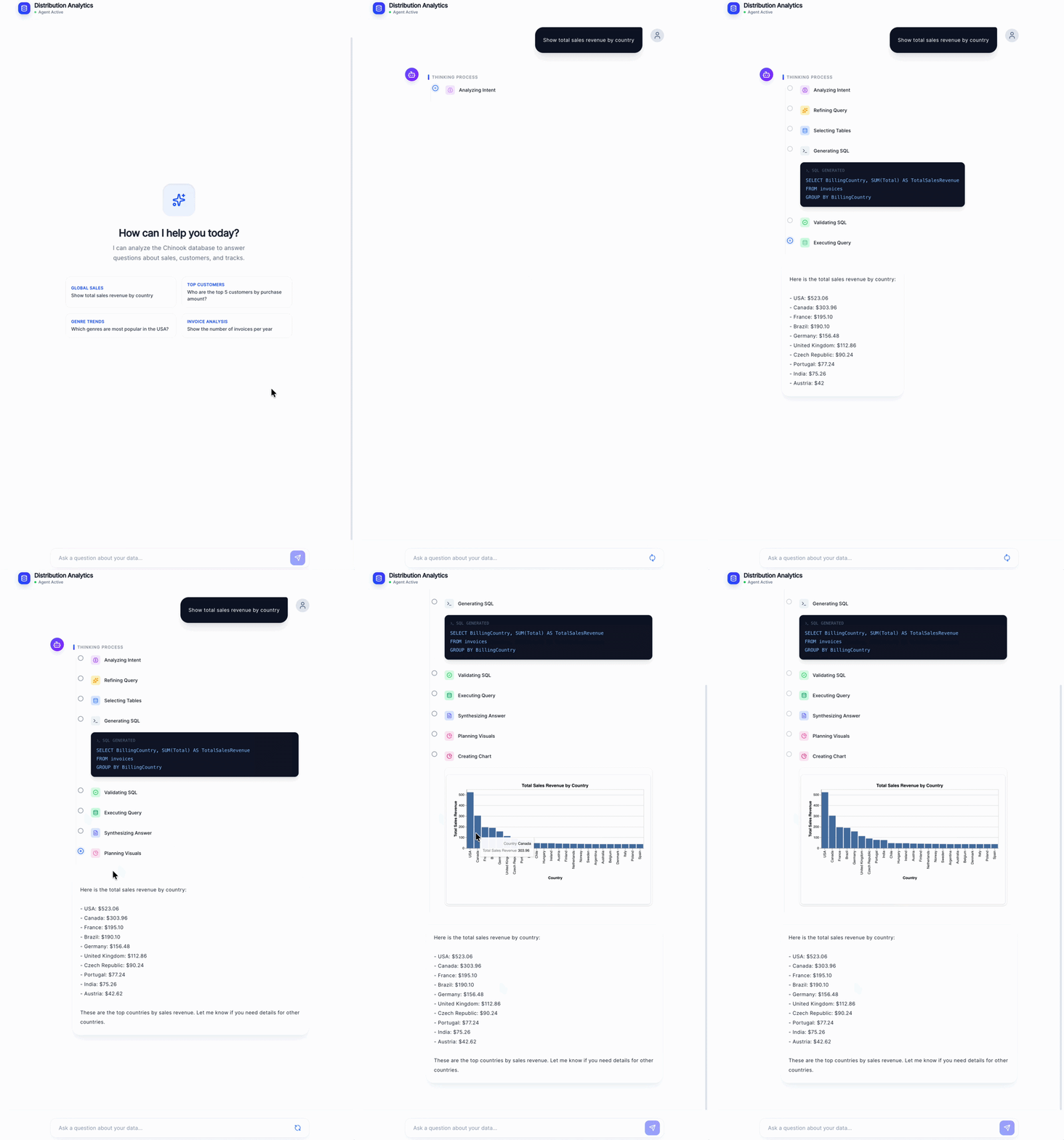
Most tutorials show you a single LLM call that converts a question into SQL. That works on toy examples. It falls apart the moment a real user touches it.
Real databases have dozens of tables. Real users ask vague, ambiguous questions. And real SQL agents need to handle errors gracefully, retry intelligently, stream responses in real time, and never, ever run a DROP TABLE on your production database.
In this post, I’ll walk you through how I designed and built a production-ready SQL agent, covering the architecture, the key design decisions, and the lessons learned along the way. We’ll go light on boilerplate and heavy on the why.
The full code (backend + frontend with live visualizations) is on GitHub: github.com/mallahyari/langgraph-sql-agent
The Stack
LangGraph: multi-node agent orchestration with conditional routing and retry loops
GPT-4o: reasoning, SQL generation, and natural language synthesis
FastAPI + Server-Sent Events: async streaming API
SQLite: database backend (the architecture is database-agnostic)
React + Vega-Lite: frontend with auto-generated charts
Why a Multi-Agent Approach?
The naive approach is one LLM call: “Here’s my schema. Here’s the user’s question. Write SQL.”
This breaks in predictable ways:
The LLM picks the wrong tables when your database has many of them
Vague questions like “show me sales” generate ambiguous queries
When a query fails at runtime, there’s no recovery path
You have zero visibility into what went wrong or why
The insight is that text-to-SQL isn’t one problem, it’s several smaller ones chained together. When you decompose it into specialized nodes, each with a single job, you get a system that’s easier to debug, easier to improve, and resilient to failure.
Think of it as a pipeline of domain experts:
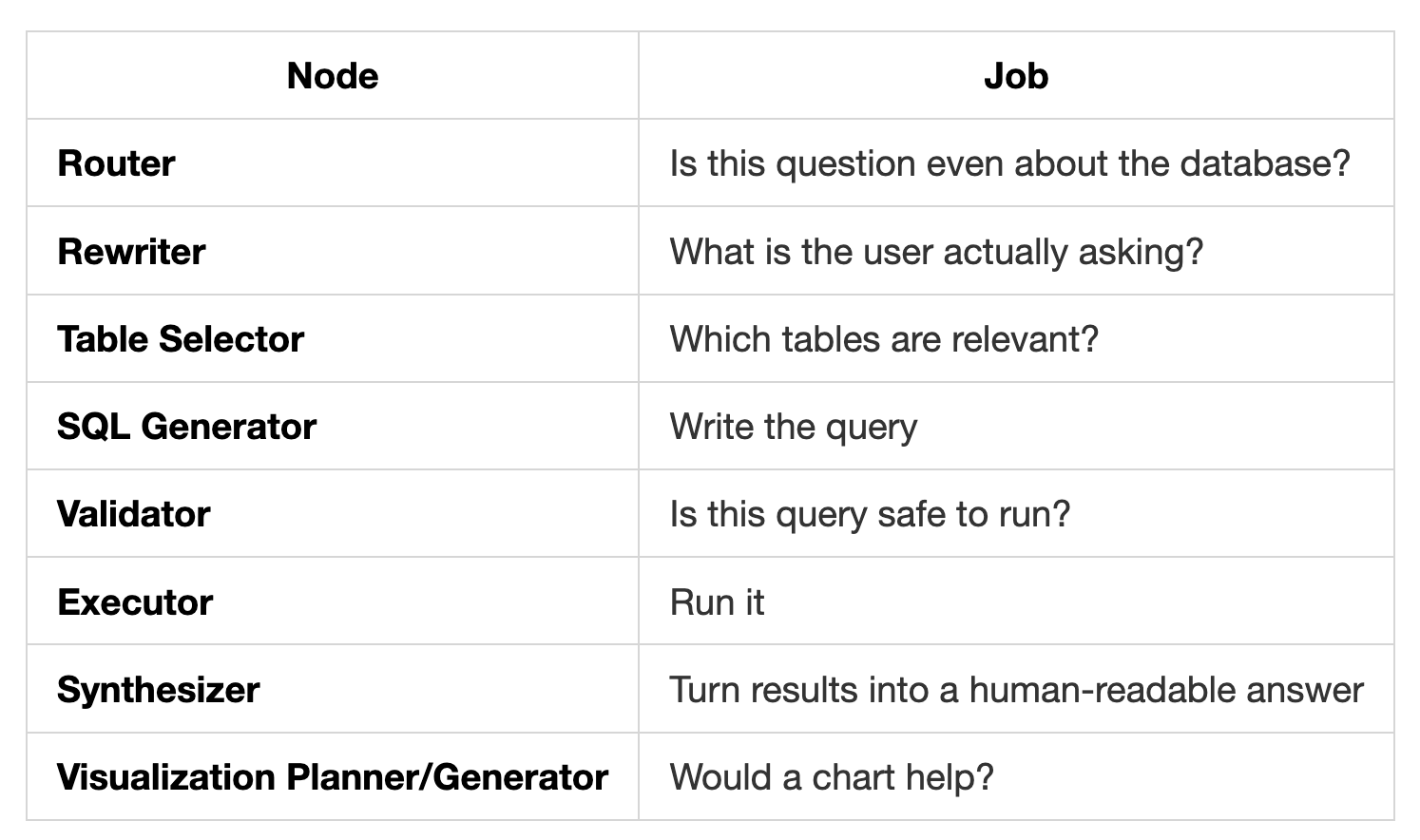
Each of these is a node in a LangGraph StateGraph. The graph connects them with conditional edges that handle routing, retries, and error recovery automatically.
The Architecture
Here’s the full workflow:
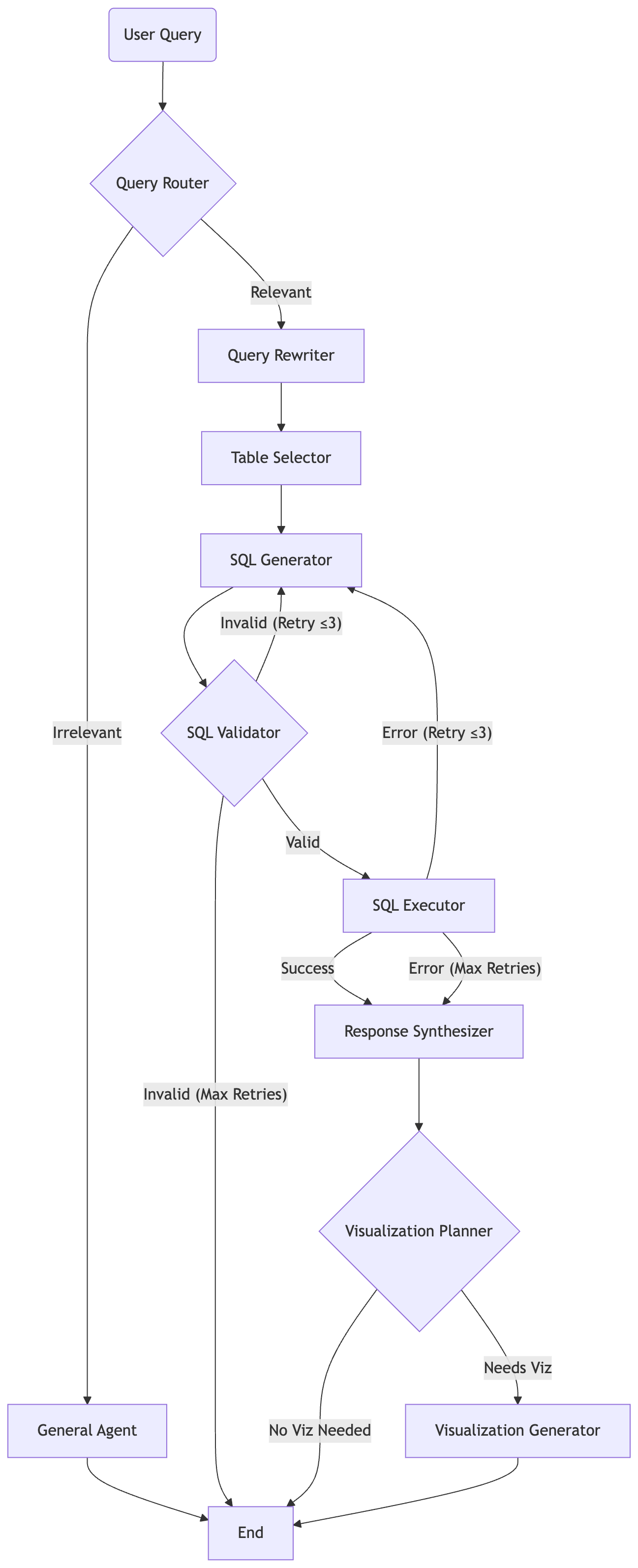
The retry loop is the key architectural decision: if the SQL fails validation or fails at runtime, the graph routes back to the SQL generator with the error message injected into the conversation. The LLM sees what went wrong and corrects itself , up to 3 times before giving up gracefully.
This is what separates a demo from a system you can actually deploy.
How LangGraph Orchestrates It
LangGraph is built on the concept of a StateGraph, a directed graph where each node reads from and writes to a shared state object. Here’s the shape of that state:
class AgentState(TypedDict):
    user_query: str
    refined_query: Optional[str]
    relevance: str
    selected_tables: List[str]
    generated_sql: str
    query_result: List[Dict[str, Any]]
    query_error: Optional[str]
    is_valid_sql: bool
    retry_count: int
    validation_error: Optional[str]
    natural_response: str
    needs_visualization: bool
    visualization_spec: Optional[Dict[str, Any]]
    logs: Annotated[List[str], operator.add]
    steps: Annotated[List[str], operator.add]
One thing worth calling out: the Annotated[List[str], operator.add] on logs and steps. This tells LangGraph to append to these lists rather than overwrite them. Every node contributes its own entries, and you end up with a full audit trail of what happened at each step, invaluable for debugging.
Routing between nodes is handled by plain Python functions:
def route_after_execution(state: AgentState) -> str:
    if state.get("query_error") and state.get("retry_count", 0) < MAX_RETRIES:
        return "sql_generator"
    return "response_synthesizer"
Simple, readable, and easy to change. The orchestration logic lives in the graph definition, completely separate from the agent implementations.
Key Design Decisions
1. Use Function Calling for Structured Decisions
Any time a node needs to produce a categorical output, “is this relevant?”, “which tables?”, “does this need a chart?” — use OpenAI’s function calling with an enum constraint instead of parsing free text.
Free text parsing is fragile. The model might say “Yes, this is relevant” or just “Relevant” or “I believe the query relates to...”, you end up writing brittle string matching. Function calling gives you guaranteed structured output:
"relevance": {
    "type": "string",
    "enum": ["relevant", "irrelevant"]
}
One call, guaranteed valid result. Use this pattern for every decision node in your graph.
2. Always Ground-Truth Check LLM Outputs
The table selector asks the LLM which tables are needed, then does this:
valid_tables = [t for t in args["tables"] if t in all_tables]That one line prevents a surprisingly common failure: LLMs confidently hallucinate table names that don’t exist. Always cross-reference any LLM output that refers to real-world entities (table names, column names, file paths) against the actual ground truth before passing it downstream.
Same principle applies to column names in the SQL generator, feed the LLM the exact CREATE TABLE schema, not a description of it.
3. Raise Temperature on Retries
At temperature=0, GPT-4o is deterministic. If the first SQL query fails and you retry with the same temperature, you get the exact same broken query. Set temperature to 0.3 on retries, just enough variation that the model explores a different approach, without going off the rails.
4. Inject Error Context Into the Retry Conversation
On retry, don’t just run the node again. Pass the failed query and the error message back to the SQL generator as prior conversation turns:
System: [schema + instructions]

User: [original query]

Assistant: [the broken SQL that failed]

User: "That query failed with: no such column 'TotalRevenue'. Please fix it."
The LLM now has the full context of what it tried and why it failed. This dramatically improves retry success rate compared to starting fresh.
5. Validate SQL Before It Touches Your Database
A safety layer that checks for destructive keywords (DROP, DELETE, TRUNCATE, UPDATE, etc.) using regex word boundaries is non-negotiable. This blocks both accidental and malicious writes before anything reaches the database.
pattern = r'\b' + keyword + r'\b'Word boundaries matter, without them, a column named dropship_count would trigger a false positive.
6. Truncate Large Results Before Synthesis
Some queries return thousands of rows. Feeding all of them to the synthesizer is expensive and often exceeds context limits. Truncate to a reasonable character limit before synthesis. The synthesizer’s job is to summarize, not to enumerate every row, so you rarely lose anything meaningful.
7. Thread IDs for User Session Isolation
LangGraph’s MemorySaver checkpointer scopes conversation history to a thread_id. Pass a unique ID per user session, and multiple concurrent users share one deployment with fully isolated state. No session collisions, no state bleed-through.
For production, swap MemorySaver for a persistent checkpointer backed by Redis or Postgres so history survives server restarts.
Streaming: Why It Matters More Than You Think
A SQL query can take 3-5 seconds end-to-end. Without streaming, your user stares at a blank screen and assumes something broke.
The architecture uses two streaming modes simultaneously via LangGraph’s astream:
updatesmode: fires after each node completes, sending structured data (SQL generated, rows returned, etc.) that the frontend can display progressivelycustommode: fires on every LLM token during synthesis, enabling word-by-word text streaming
The result is a UI that feels responsive and alive even during a multi-second pipeline. The user sees the SQL appear, then the row count, then the explanation streaming in, then the chart, all without waiting for the full workflow to finish.
This is delivered over Server-Sent Events (SSE) via a FastAPI StreamingResponse. SSE is simpler than WebSockets for this use case: unidirectional, HTTP-native, no handshake overhead.
One gotcha: if you run behind Nginx, add X-Accel-Buffering: no to your response headers. Without it, Nginx buffers the entire response and defeats the purpose of streaming entirely.
The Visualization Layer
One of the more interesting parts of the system is the automatic chart generation. After synthesizing a text response, a visualization planner node decides whether a chart would add value, checking for explicit requests (”plot this”, “show a chart”) and analyzing the data shape (time series, categorical breakdown, single values).
If a visualization makes sense, a visualization generator node calls GPT-4o in JSON mode to produce a Vega-Lite spec directly from the query results. The frontend renders it instantly.
This means a query like “show me monthly revenue over the past year” automatically produces a line chart, with no hardcoded chart types and no user configuration required. The LLM figures out the right encoding, axes, and title from the data itself.
Vega-Lite is a great fit here because it’s declarative JSON, the LLM can produce it reliably in JSON mode, and the frontend renders it without needing to interpret any code.
What the Frontend Does
The backend streams JSON events. The React frontend listens and progressively renders:
A “thinking” indicator while nodes are running
The generated SQL in a syntax-highlighted code block (so users can inspect it)
The row count and raw data in a table
The natural language explanation, streaming token by token
The Vega-Lite chart, rendered automatically when the visualization spec arrives
Showing the SQL is a deliberate choice. It builds trust, users can see exactly what query was run, verify it makes sense, and catch errors. It also makes the system feel transparent rather than like a black box.
Common Failure Modes (And How to Avoid Them)
Hallucinated column names. The LLM makes up a column that doesn’t exist. Fix: always pass the exact CREATE TABLE DDL as schema context, not a paraphrased description.
Overly broad table selection. The table selector includes every table “just in case,” bloating the schema context. Fix: require the LLM to justify each selected table, or use strict function calling with an explicit count limit.
ORDER BY placement in UNION queries. SQLite requires ORDER BY to appear after the final SELECT in a UNION ALL. The LLM often puts it in the wrong place. Fix: add this as an explicit rule in the SQL generator’s system prompt.
Markdown in SQL output. The model wraps its SQL in ```sql ``` fences. Always strip these before executing.
Retry storms. Without a hard retry cap, a broken query can loop indefinitely. Enforce a maximum retry count in state and route to a graceful error response when exceeded.
Going Further
This architecture is a foundation. A few directions worth exploring:
Scale to larger schemas. With hundreds of tables, feeding even table names to the LLM becomes unwieldy. Add a vector similarity search step to retrieve semantically relevant tables before the table selector node runs.
Row-level security. The executor currently runs all queries with the same database credentials. In a multi-tenant system, inject user-specific filters or use separate database roles per user.
Human-in-the-loop. LangGraph has native support for breakpoints and interrupt_before, you can pause the graph before execution and require a human to approve the generated SQL. Useful in high-stakes environments.
Swap the LLM. The OpenAI client lives in a single service file. Replace it with Anthropic’s Claude, a local Ollama model, or any OpenAI-compatible endpoint. The rest of the system stays the same.
Persistent memory. Right now, conversation history lives in memory and resets on restart. Swap MemorySaver for LangGraph’s AsyncPostgresSaver for durable multi-session memory.
The Full Picture
What makes this system work in practice isn’t any single clever trick, it’s the combination:
Specialization: each node does one thing and does it well
Retry with context: the graph corrects its own mistakes with full error awareness
Safety by design: SQL is validated before it ever reaches the database
Streaming at every layer: users see progress, not spinners
Grounded outputs: LLM results are always checked against reality before use
Separation of concerns: orchestration logic lives in the graph, not in the nodes
The LangGraph pattern, decompose into nodes, connect with conditional edges, add retry loops, generalizes far beyond SQL. Any problem where a single LLM call is too brittle is a candidate for this architecture.
The complete code for both the backend and the React frontend with live Vega-Lite visualization is available here:
github.com/mallahyari/langgraph-sql-agent
If you build something with this or adapt it for your own database, I’d love to hear what you changed and why.